
[intro]In this Guide, you’ll learn how to link your Snapchat Profile to your EKM online shop using the Social Plugins feature.[/intro]
[summary]
[/summary]
Since being founded in 2011, Snapchat has grown to over 360 million active users per month, with upwards of 3 billion snaps generated every day. Whereas similar image sharing platforms such as Instagram allow users to post images and videos that are permanent on a profile (unless the user deletes or archives them), on Snapchat personal profiles, the media posted is only visible for a minimal period of time.
If you’ve not used Snapchat to promote your business before, you need to be aware that it is only really ideal if you are targeting specific demographics. 82% of Snapchat users are 34 years old or younger, so if you are aiming for an older demographic, Snapchat might not be the ideal platform for your brand.
If you’ve not used Snapchat before, you’ll need to open an account. If you want to create a Public Profile on Snapchat to promote your EKM online shop, you’ll need to follow the steps in this Guide first.
Locating your Snapchat username
1. Open the Snapchat app on your phone, and click the profile in the top left-hand corner:
2. Copy your username from this area:
Linking to your EKM online shop
3. Log into your EKM online shop and from the Dashboard page, click the Features tab:
4. Click the green Launch button for the Social Plugins feature: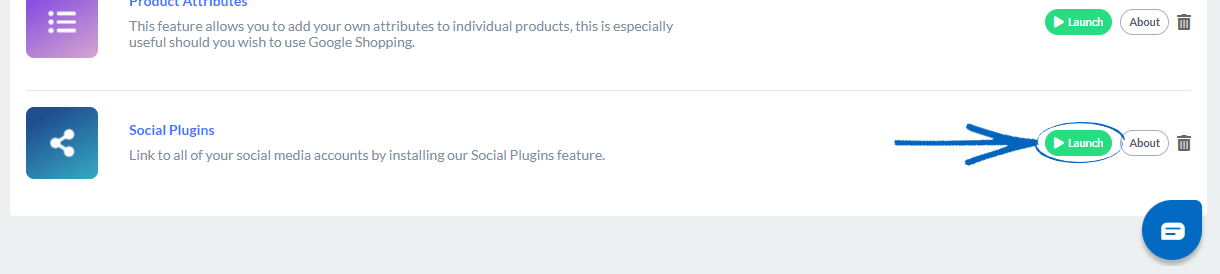
5. Ensure that the top drop-down menu is set to Main Template:
6. Then you need to drag the Snapchat icon from the top box into the bottom box:
7. In the Username field, add in your Snapchat username, and click the green Update button:
8. You see the red warning bar disappear, meaning that the Snapchat icon has been correctly configured:
[more]
[/more]
[contact]If you need our help with your EKM online shop, contact the Customer Support Team, who can point you in the right direction. Our opening hours are 9 am - 5.30 pm Monday to Friday, for telephone calls, live chats, and emails. Outside of these hours, you can leave a message for us in the live chat window or email [email protected], and we will answer as soon as possible. If you'd like to suggest a feature or an upgrade on any of the EKM platforms, please let us know on the EKM Suggestions Board. [/contact]